
Nothing exposes a gesture setup like a game. Ten minutes into a session, a stray palm brushes the edge, Android reads a Back swipe, the game minimises — and the post-match search begins for how to disable accidental gestures mobile gaming launcher setups keep triggering. The first thing to understand is whose gestures are actually firing, because three different systems get blamed as one: the launcher’s gestures, Android’s navigation gestures, and the game’s or OEM’s gaming tools.
Here is the clarifying fact most threads miss: Smart Launcher gestures cannot fire inside a game at all. Launcher gestures exist only on the launcher’s own surfaces; the moment a game is in the foreground, your swipes belong to the game and to Android’s system navigation. So when a “launcher gesture” ruins a match, the culprit is one of three things: a system edge gesture (Back/Home) misfiring, an OEM gaming overlay or edge panel intruding, or the moment of returning to the home screen — where a game-exit swipe lands on the launcher and immediately triggers one of your assignments. Each has a different fix.
How to Disable Accidental Gestures: Mobile Gaming Launcher Myths and Real Culprits
| What actually happened | Real culprit | Fix family |
|---|---|---|
| Game minimised mid-play on an edge swipe | Android Back/Home gesture | Game-mode gesture blocking, double-swipe-to-exit |
| A panel or sidebar slid in during play | OEM edge panel / gaming overlay handle | Move/disable the handle per game |
| Right after exiting, an app or search opened uninvited | Your launcher gesture caught the exit motion’s tail | Reassign the low-value gesture; adjust exit habits |
| Notifications shade dropped during play | System swipe or an edge tool from the edge guide | Game mode notification blocking; exclude games in edge tools |
The System-Level Fixes (Where the Problem Lives)
- Use your phone’s game mode. Samsung Game Booster, Xiaomi’s Game Turbo, OnePlus/Realme game space apps and Pixel’s Game Dashboard all offer some combination of gesture blocking, “double swipe to exit full screen,” and notification suppression while a game runs. The double-swipe exit setting is the single most valuable one: it converts the accidental minimisation into a harmless first swipe.
- Exclude games in any edge-gesture tool. If you layered an edge app from the edge swipe notification setup, its per-app exclusion list exists for exactly this; add your games so its zones simply do not exist while you play.
- Move or hide OEM edge handles for gaming sessions — Samsung’s Edge Panel handle can be repositioned to a corner you never grip; gaming overlays usually allow the same.
- Consider button navigation for serious sessions. It is the nuclear option, but players who compete switch to three-button navigation during tournaments precisely because it deletes the edge problem entirely. Android remembers nothing — you must toggle it yourself — yet for a known two-hour session the trade can be worth it.
Treat these numbers as a starting point: apply them in Smart Launcher 6 under Settings → Home screen → Grid, use the layout for a day, then nudge one value at a time — your wallpaper, widget sizes and one-handed reach all shift what feels right.
The Launcher-Side Half: Exit-Motion Discipline
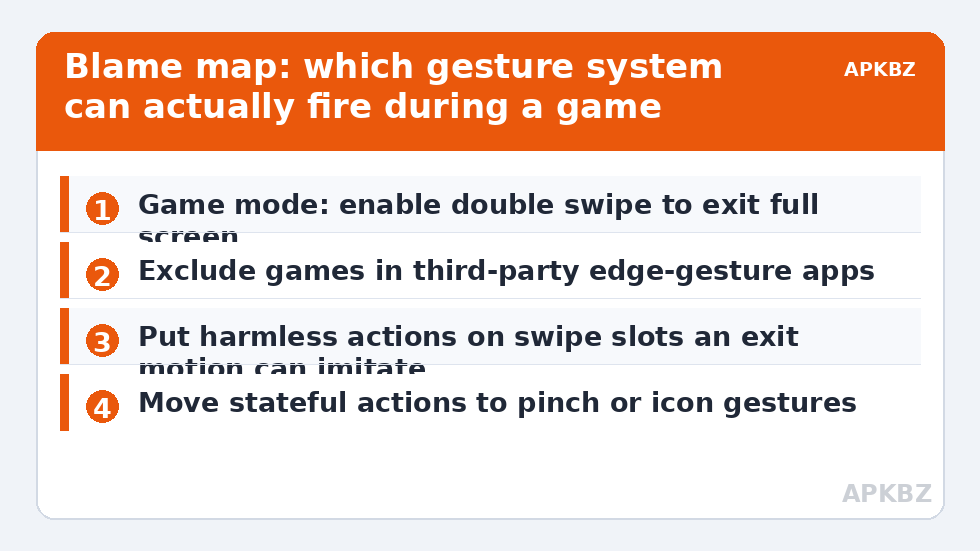
The one genuinely launcher-owned problem is the landing: you swipe to exit a game, the home screen appears, and the follow-through of your exit swipe — or your immediate next touch — lands as a double tap or a swipe that fires an assignment and opens something you did not want. Mitigations are about assignment design. Keep your highest-frequency, lowest-regret actions on the gestures an exit motion is most likely to produce: a downward or upward swipe immediately after returning home usually opens search or the app page, both harmless and instantly reversible. Move any gesture that fires something stateful or communicative — a Tasker task from gesture-driven automation, a settings shortcut from the settings gestures guide — to low-accident slots like the pinch or an icon gesture that an exit swipe cannot plausibly imitate.
- If accidental fires cluster on one specific gesture, that gesture’s motion resembles your exit motion; swap its assignment with a calmer slot rather than deleting it.
- Full-screen games that themselves use edge swipes (rhythm, racing) deserve the double-swipe-to-exit setting most; menu-heavy games rarely trigger the issue.
- After enabling a game mode, re-test your launcher gestures on the home screen — a few aggressive OEM modes also suspend launcher-adjacent services, which will look like the delay problems in delayed gesture response fixes until the mode is understood.
What Not to Install for This Problem
App stores are full of “gesture blocker” and “touch lock” utilities aimed at gamers and parents. The legitimate end of that category locks touches inside a session (useful for handing a child a video) and is honest about it. The rest are accessibility-permission collectors solving a problem better solved by your game mode’s settings. Before installing anything, exhaust the three free layers above: game mode gesture blocking, edge-tool exclusions, and assignment design. In practice they resolve every case that arrives wearing this article’s title. Keep the final configuration — game mode choices included — in the notes with your gesture configuration backup, since gaming settings live outside the launcher and are easily forgotten when you change phones. Category home: Gesture Setup.
The Grip Factor: Cases, Rings and Handedness in Play
One variable sits upstream of every software fix: how the phone is physically held. Landscape gaming puts your palms and the heels of your hands exactly along the long edges — the same edges Android listens to — so grip geometry decides how often stray contact reaches the Back strip in the first place. A thick case with a raised lip paradoxically helps by giving your fingers a non-screen rail to rest on; a bare, slippery phone invites micro-slides that end in edge contact. Grip rings and controller-style attachments move the contact points off the glass entirely, which is one reason dedicated mobile controllers report so few “gesture exits”: the hands are on plastic, not on the sensor surface. Handedness matters too — most players’ dominant thumb sweeps a wider arc in menus between matches, and menu-time is statistically where many accidental exits actually happen, not mid-combat. If your incidents cluster in menus and lobbies, the remedy is menu discipline and the harmless-assignment design above, not deeper system surgery. Audit honestly when your exits happen before buying solutions for the wrong moment.
One last pattern worth recognising: if accidental exits began suddenly on a phone that behaved for months, something in the stack changed — an OS update retuned edge sensitivity, a game update moved its own UI toward the edges, or a new case altered your grip geometry. Work backwards from the change date before rebuilding your defences from zero; the newest layer in the stack is guilty until proven innocent, in gaming setups as in everything else on a phone.
Frequently Asked Questions
Can my Smart Launcher gestures really fire while I am gaming?
No. Launcher gestures exist only on the launcher’s surfaces. What fires mid-game is Android’s navigation gestures or an OEM gaming/edge layer. The launcher’s only involvement is the moment you land back on the home screen, where the tail of your exit motion can trigger an assignment.
What is the single best setting against accidental exits?
“Double swipe to exit” (names vary) in your phone’s game mode or full-screen gesture settings. Requiring two deliberate swipes to leave a full-screen app turns the accidental minimisation into a no-op while keeping intentional exits easy.
Should I switch to three-button navigation for gaming?
For long or competitive sessions, it is a legitimate and complete fix — buttons cannot be swiped by accident. For casual play it is usually overkill; game mode gesture blocking plus edge-tool exclusions solve the problem without giving up gesture navigation everywhere else.
An edge panel keeps opening during games. How do I stop just that?
Reposition its handle to a corner outside your grip, shrink it, or disable Edge Panels while gaming. If you use a third-party edge gesture app, add the game to its exclusion list instead — its zones will not exist while that app is in the foreground.
Why does something open by itself right after I exit a game?
Your exit swipe’s follow-through lands on the home screen as a launcher gesture. Put harmless, reversible actions (Smart Search, app page) on the swipe directions an exit motion produces, and move stateful actions — automation tasks, toggles — to pinch or icon gestures that cannot be imitated by accident.