
Gesture setups rarely die all at once. They rot: one swipe stops firing after an update, a double tap opens the wrong thing, an icon gesture quietly reverts. When the map no longer matches your memory, the instinct to wipe everything is understandable — but knowing how to reset corrupted gesture mappings smart launcher configurations suffer from means knowing the staged version of resetting: diagnose first, surgically reset the gesture layer second, and treat a full launcher data wipe as the last resort it deserves to be.
“Corrupted” also deserves definition, because true data corruption is rare. Most so-called corruption is one of four mundane things: an update remapped defaults, an OEM battery manager broke the gesture-adjacent services, a restored backup clashed with a newer build’s settings format, or an assignment was changed accidentally (a pocket long-press menu is more capable than people expect). The staged reset below resolves all four without costing you your layout.
Stage Zero: Prove It Is the Mapping, Not the World
| Check | How | If it fails, suspect |
|---|---|---|
| One gesture fires a light action | Temporarily bind a swipe to Expand notifications | Assignment layer is fine; your original target is the problem |
| All gestures dead | Try double tap + a swipe + an icon gesture | Launcher services/battery killing, not individual mappings |
| Works after launcher restart | Restart Smart Launcher from its settings or force stop and relaunch | A stuck process — note it, but no reset needed yet |
| Wrong actions fire | Open Gestures and inputs and read the actual assignments | Remapping by update or accident — fix entries individually |
Half of all “corruption” resolves at this table: either a single assignment is wrong (edit it) or everything is dead (a services problem, addressed by the battery exemptions in delayed gesture response troubleshooting). Proceed to resetting only when assignments themselves are scrambled across multiple gestures, or when the gesture screen’s behaviour contradicts what it displays.
Reset Corrupted Gesture Mappings: Smart Launcher Surgical Reset (Stage One)
- Write down or screenshot your current map — even a scrambled one; you will want the parts that were right. If you kept a backup per gesture configuration backups, this step is already done and Stage Two may be unnecessary.
- Open Settings → Gestures and inputs. For each misbehaving gesture, open its picker, set it to None, back out, then reassign it fresh. The None-then-assign cycle clears stale entries more reliably than overwriting directly.
- Do the same for per-icon gestures on affected icons (long-press the icon, clear its gesture, reassign), since icon-level assignments live separately from the global ones.
- Restart the launcher (its settings include a restart option on most builds; otherwise force stop Smart Launcher in Android Settings and return home) and re-test every assignment once, slowly.
- If behaviour is now correct, re-export a fresh backup immediately — you have just hand-built a known-good state, and it should become the new restore point.
Treat these numbers as a starting point: apply them in Smart Launcher 6 under Settings → Home screen → Grid, use the layout for a day, then nudge one value at a time — your wallpaper, widget sizes and one-handed reach all shift what feels right.
Stage Two: Restore, and Stage Three: the Nuclear Option
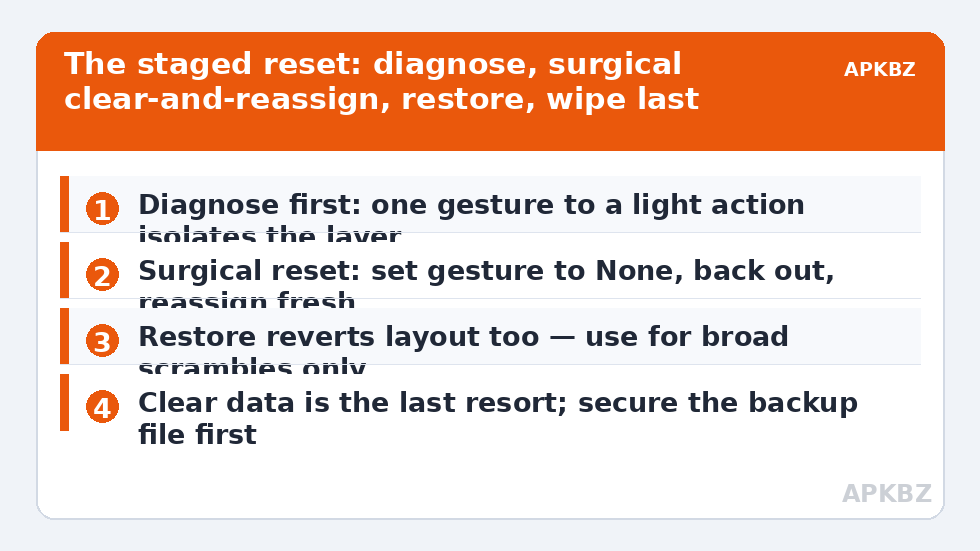
Stage Two is a restore from your Smart Launcher backup: use the launcher’s backup/restore settings to import your exported configuration. Restores fix wholesale scrambling in one move, at the price of reverting everything in the backup — layout, settings and gestures — to the backup’s date. That is the right trade when the scramble is broad and the backup is recent. It is the wrong trade when only gestures are wrong and your layout has evolved since the backup; in that case Stage One’s patience wins.
Stage Three, clearing Smart Launcher’s data from Android Settings → Apps, is a factory reset of the launcher: total loss of layout, categories customisation and gesture map, in exchange for a guaranteed-clean settings store. Reserve it for the narrow case where the gesture screen itself crashes, assignments refuse to save at all, or the launcher misbehaves identically after a restore — evidence the stored data, not its contents, is damaged. After a data wipe, restore your backup if one exists; if none does, you have just acquired a permanent opinion about backing up gesture configurations, and the rebuild order in this category — swipes first, then double tap, then icon gestures — minimises the pain.
- Never clear data and then look for the backup file; locate and copy the backup somewhere safe (cloud or PC) before any destructive stage.
- If assignments will not save even after Stage One, check available storage: a phone at 100% full cannot write settings reliably, and the “corruption” is really a filesystem gasping.
- Document what the scramble looked like; identical symptoms after the next update point at the updater, and a pattern is evidence if you report the bug.
Preventing the Sequel
Most scrambling arrives on updates — launcher updates changing settings formats, OS updates resetting adjacent system layers (accessibility services, battery exemptions, edge behaviour per Android 14/15 gesture conflicts). The prevention routine is correspondingly dull: export a backup before major updates, re-test the full map once after them, and re-export once the post-update state is verified good — never overwrite your only backup with an unverified state. Two restore points (pre-update and verified post-update) make every future reset a five-minute errand instead of an archaeology project. Full category: Gesture Setup.
When It Is Not the Launcher at All
Before any reset, one more differential diagnosis is owed, because three external conditions impersonate gesture corruption convincingly. The default launcher changed. After some OS updates and OEM “optimisations,” Android’s default home app silently reverts to the stock launcher; your gestures “vanish” because you are looking at a different launcher’s home screen. Check Settings → Apps → Default apps → Home app before touching Smart Launcher’s data. An accessibility or edge tool died. If the “broken” gestures were actually routed through an edge app or remapper, its service being killed looks identical to a launcher scramble; the fix lives in that app’s battery exemption, not here. The touchscreen is at fault. Ghost touches and dead strips after a drop produce erratic gestures that no reset cures; a drawing app’s scribble test across the whole panel settles it in a minute. Ten minutes of differential diagnosis is what separates a reset that works from a reset that merely happens.
Frequently Asked Questions
How do I reset just the gestures without losing my whole layout?
Use the surgical reset: in Gestures and inputs, set each misbehaving gesture to None, back out, then reassign it fresh, doing the same for any affected per-icon gestures. Then restart the launcher and re-test. Clearing the app data is not required and would delete your layout along with the gestures.
Why did my gesture assignments change after an update?
Updates occasionally migrate settings to a new format and fall back to defaults for entries they cannot translate, and OEM updates can reset adjacent system layers the gestures depend on. This is common enough that exporting a backup before major updates — and re-testing after — is standard practice among long-term gesture users.
Restore from backup or rebuild manually?
Restore when the scramble is broad and your backup is recent; the cost is reverting your layout to the backup date too. Rebuild manually (Stage One) when only a few assignments are wrong or your layout has changed significantly since the backup. Keep two restore points so this choice stays easy.
My gesture settings will not save at all. What does that mean?
First check storage: a completely full phone cannot write settings files reliably. If storage is fine and assignments still refuse to persist after a launcher restart and a restore attempt, the settings store itself may be damaged — that is the one case where clearing Smart Launcher’s data (after securing your backup file elsewhere) is justified.
Will clearing Smart Launcher’s cache fix scrambled gestures?
No. Cache holds temporary rendering and indexing data, not your assignments. Clearing it is harmless but irrelevant to mapping problems, and it can temporarily slow the search page while indexes rebuild. Assignments live in the app’s settings data — which is why the destructive stage is clearing data, and why it is the last resort.