
To resolve launcher feature lockout problems after an Android system patch, first understand that nothing has been “locked” in the licensing sense. What actually happens on update day is a pile-up of small resets: Android re-validates permissions and may revoke ones not recently used, the OEM battery manager re-applies its defaults (autostart off, sleeping list on), the default-home choice is cleared as the stock launcher re-registers, deep links and notification listeners de-register, and the launcher’s own caches were built for the old OS build. Each lost capability looks like a feature that stopped working — badges gone, gestures dead, search incomplete, the launcher “not staying” as default. Treating it as one mysterious breakage wastes hours; treating it as a checklist of resets takes fifteen minutes.
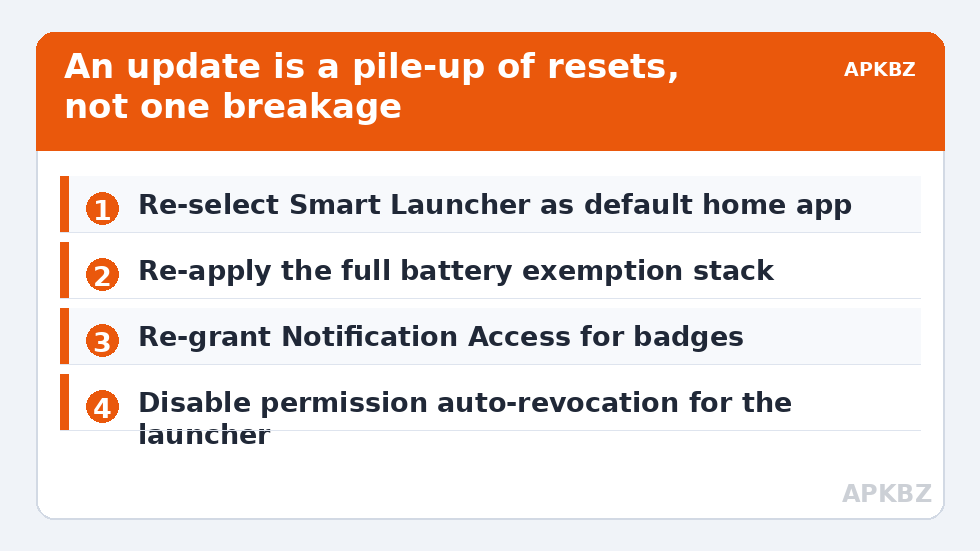
The post-update checklist, in order
Run these in sequence after any major update — security patches rarely cause the full pile-up, but version jumps (Android 14→15, One UI or HyperOS generation changes) reliably do:
- Default home: Settings > Apps > Default apps > Home app — re-select Smart Launcher. The reset mechanism is dissected in setting Smart Launcher 6 as default permanently.
- Battery exemption: Settings > Apps > Smart Launcher > Battery > Unrestricted — then your OEM’s second layer (MIUI Autostart + No restrictions, Samsung Never sleeping apps, ColorOS allow background activity) per preventing OEM battery savers from killing the launcher. Updates reset these silently and often.
- Notification Access: re-grant it if badges died — Settings > Notifications > Special app access > Notification access. The badge-specific diagnosis is in notification count badges disappearing after battery saver mode.
- Permissions review: Settings > Apps > Smart Launcher > Permissions — Android’s unused-app permission reclamation and update-time resets both land here. Restore what the launcher legitimately needs.
- Restart the launcher, then the phone. A launcher restart rebuilds its registrations; a phone restart rebuilds everyone’s.
Treat these numbers as a starting point: apply them in Smart Launcher 6 under Settings → Home screen → Grid, use the layout for a day, then nudge one value at a time — your wallpaper, widget sizes and one-handed reach all shift what feels right.
Gesture and navigation features specifically
If it is the gesture layer that “locked out” — double-tap to sleep dead, swipe actions ignored — check two things. First, Accessibility: some launcher features borrow accessibility services, and updates can switch those off; re-enable under Settings > Accessibility > Installed apps. Second, the navigation mode itself: updates occasionally flip the phone between gesture and button navigation or reset the OEM’s gesture handler, which changes what the launcher receives. Confirm the mode you actually use is selected in Settings > Display > Navigation bar (One UI) or your brand’s equivalent, then test the launcher gestures again. Do not reinstall the launcher for this class of fault; the registration it needs lives in system settings, not in the app.
Search, widgets, and inventory after an update
An incomplete app inventory after an update — search missing apps, drawer categories scattered — is usually the rebuild problem from Smart Search not finding installed apps: the launcher’s cached inventory was invalidated and has not fully refreshed, which one restart plus a cache clear (the safe kind, per clearing cache without losing layouts) resolves. Widgets showing “problem loading widget” are the host re-binding under new rules: remove and re-add the affected widget rather than the launcher. These are twenty-second fixes individually; their menace is purely that they arrive together, disguised as one big failure.
The trade-off nobody warns about: auto-revocation
Modern Android periodically revokes permissions from apps it judges unused, and — here is the trap — a launcher can look “unused” to the heuristic because you never open it from an icon. Turn off that behaviour for Smart Launcher specifically: Settings > Apps > Smart Launcher > Permissions > “Pause app activity if unused” / “Remove permissions if app is unused” — disable it. State the exchange plainly, as with every exemption in this category: you are opting one trusted app out of an automatic safety system. For the app that constitutes your home screen, continuous permission is not a risk factor, it is the job description.
When it is genuinely the update’s bug
Sometimes the pile-up clears and one feature still fails — a specific gesture broken on a specific build, crashes tied to the new WebView version. At that point: update Smart Launcher and Android System WebView from the Play Store (both patch fast after OS releases), check the developer’s changelog for your exact symptom, and give it a few days before heroic measures. Rolling back an OS update is not a realistic consumer remedy, and factory resets for a launcher feature are arson for a candle. Log the symptom after each charge cycle; if it also appears in other apps, you have a system bug to report to the OEM, not a launcher configuration to fix. The remaining single-symptom repairs are covered across the Fixes & Battery hub.
Document the failure before you fix it
A habit that separates recoverable lockouts from recurring ones: before running the checklist, spend sixty seconds writing down exactly which features failed — badges, search inventory, double-tap, the default itself — and whether they failed immediately after the update or crept in over the following days. Immediate failures are reset-shaped and the checklist will nearly always clear them. Creeping failures are different: they suggest an app update that rode along with the OS update (your launcher, WebView, or a widget updated the same night), or an OEM server-side feature flag, and the remedy is updating or rolling back the app, not re-running system resets. The note also arms you if you end up reporting a genuine bug: “badges and inventory broke within an hour of the One UI update; permissions and notification access were found revoked” is a report a developer can act on, while “everything broke after the update” is weather. Precision is a diagnostic instrument, and it costs a minute.
What to do while you wait for a patch
Suppose the checklist is done, one feature is still dead, and the evidence says it is the OS build’s bug. The interim is survivable if you route around the specific loss instead of mourning the whole launcher: badges gone means leaning on the notification shade for a week; a dead gesture means the same action gets a home-screen shortcut; search incomplete means the drawer’s categories carry the load — Smart Launcher’s automatic categories are precisely the fallback that makes a broken search tolerable. None of this excuses the bug, but it converts a broken phone into a slightly less convenient one, and it keeps you from the desperate measures — downgrade guides, mystery system apps, factory resets — that turn a vendor’s one-week bug into your one-month problem.
Frequently Asked Questions
Why do so many launcher features break on the same day as an update?
Because an update is not one change but many: permissions re-validated, battery defaults re-applied, the default launcher re-registered, listeners de-registered, caches invalidated. Each produces its own symptom, and they arrive together, imitating a single catastrophic failure.
Which setting should I re-check first after an update?
The battery exemption stack — stock Unrestricted plus your OEM’s autostart/never-sleep layer. It is the reset with the widest blast radius: a launcher that cannot stay resident will show redraws, dead badges, and stale widgets all at once.
Android keeps removing my launcher’s permissions. Can I stop that?
Yes. Android’s auto-revocation targets apps it thinks are unused, and launchers can be misjudged because they are never opened from an icon. In the app’s Permissions screen, disable “Remove permissions if app is unused” / “Pause app activity if unused” for Smart Launcher.
Should I reinstall Smart Launcher after a big update?
Almost never as a first move. The broken registrations live in system settings — defaults, permissions, notification access, battery lists — and a reinstall does not restore those; it just adds data loss risk. Work the checklist first.
A feature is still broken after the whole checklist. Now what?
Update Smart Launcher and Android System WebView, then check the developer’s release notes for your symptom. Some post-update faults are genuine OS bugs that only the next patch fixes; verifying the fault also appears outside the launcher tells you it is the system’s, not yours.


